Nolan Vale@nolanbuildsFictional
Tiny milestone: $42K MRR. One person. No funding.
Next stop: $1M ARR. Anyway, back to building.
 PostZapper
Coming soon to Chrome
PostZapper
Coming soon to Chrome
A Chrome extension for X
PostZapper covers posts that match the filters you choose. Hold Peek to look underneath, or Keep visible to bring one back.
X · At launchThreads · Planned
Not in the Chrome Web Store yet.
Choosing a zapper restarts the feed. Scroll to zap; hold Peek to look underneath.
Nolan Vale@nolanbuildsFictional
Mira Okafor@mira_walksFictional

Avery Flint@averywinsFictional
Growth Daily@growthdaily_hqFictional

June Lindqvist@junebakesFictional
Signal Sprint@signalsprintFictional
Hot Take Club@hottakeclubFictional
Priya Nair@priyarunsFictional
Scroll inside the feed to find the next post
Matched wording:
In PostZapper, this card leads to the filter so you can tune it or switch it off. Peek and Keep visible change this post only.
On this page the matches are fixed for the example posts. They are the ones PostZapper’s local wording rules find for these exact words, and those rules can make mistakes.
47 premade filters for hooks, engagement requests, sales funnels, topics and more, plus your own words. Switch each one on or off and pick its colour.
When a post matches, its words or image get a cover in that filter’s colour. Everything else stays readable.
Peek underneath, keep it visible, tune the filter, or switch PostZapper off from the rail at the top of X.
Words and images get separate covers, and each cover has its own controls.
Peek and Keep visible never change your filters or teach PostZapper a rule. If you keep peeking at one filter’s posts, PostZapper may ask whether to tune that filter. Nothing changes unless you choose.
Add a phrase in Your filters, or save a wording rule from the target button on any post. Posts with that wording are covered the same way.
Recent lists what was covered and why, with Keep visible and Tune filter right there.
Want an account left alone? Add it to Trusted accounts and automatic filters skip it.
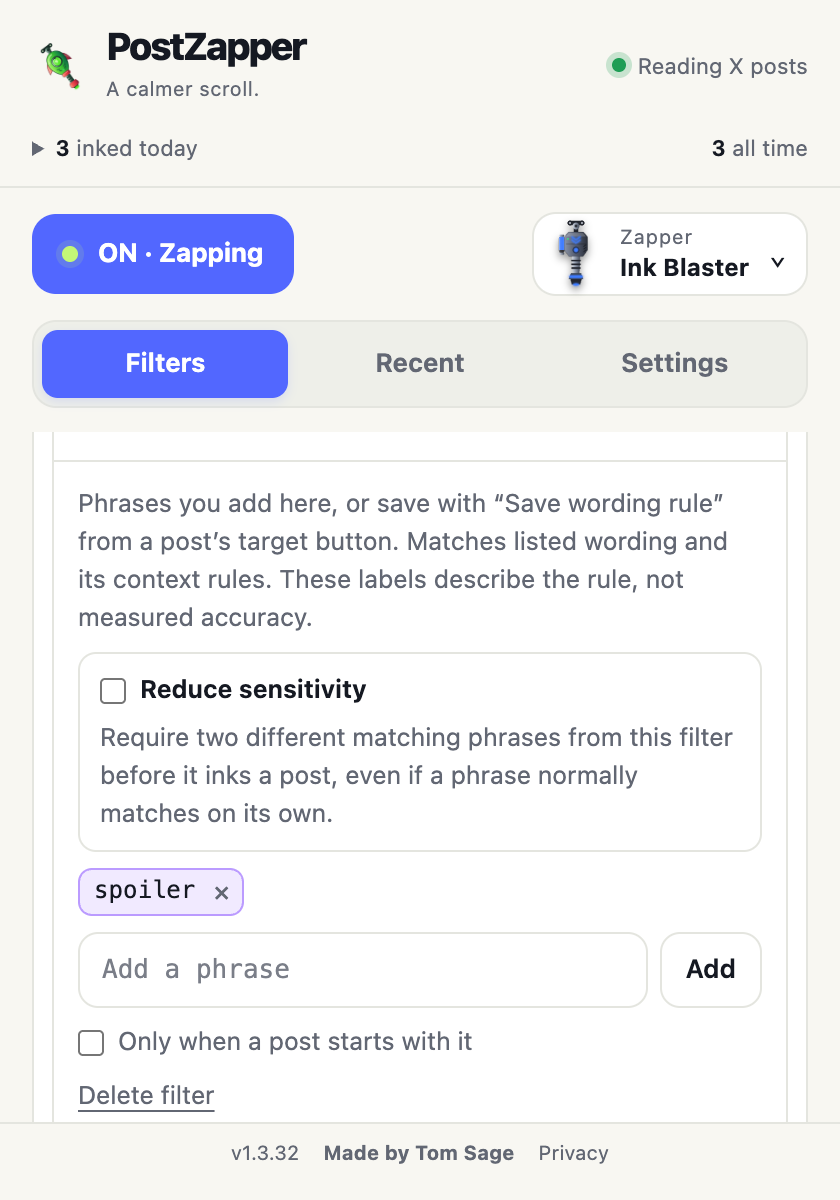
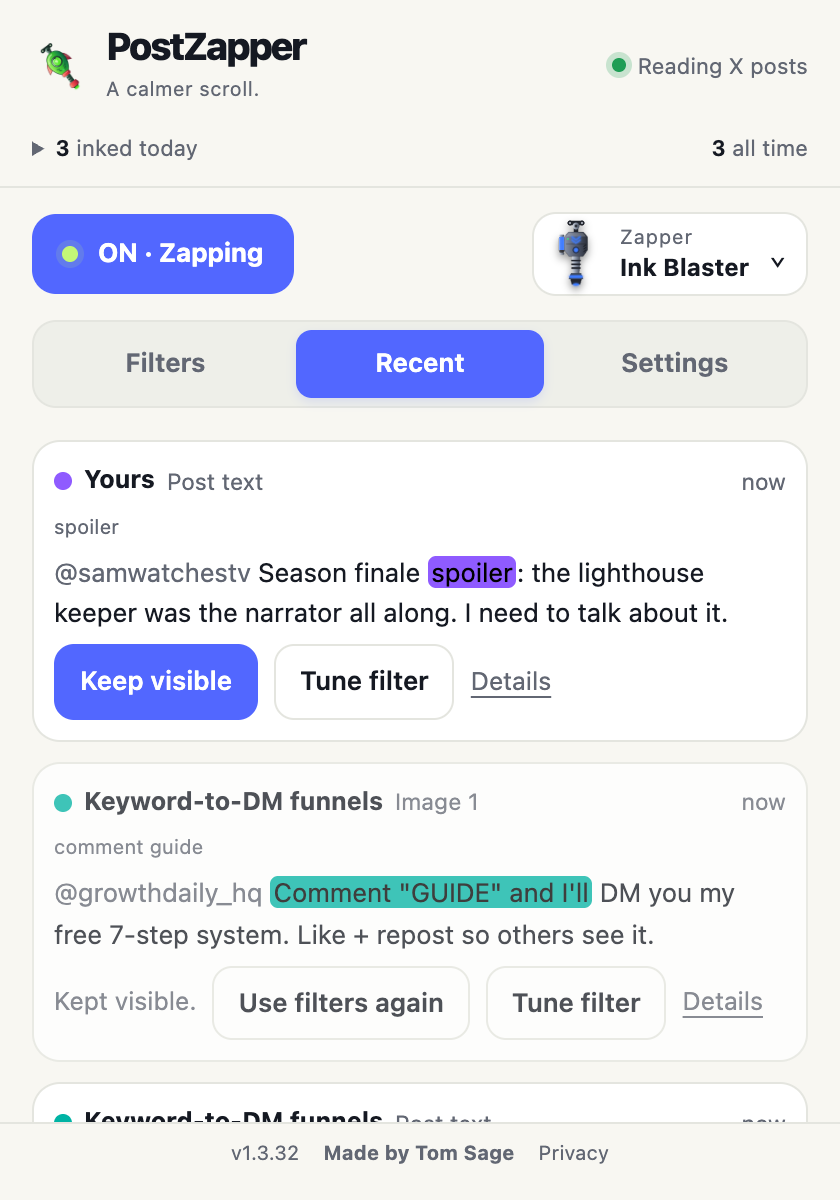
Each filter looks for wording and context: the phrase itself, plus nearby clues such as quotes and negation. It all runs on your computer, so there’s no account, API key or AI model to set up. Rules like these can miss posts or cover one you wanted, which is why every cover keeps Peek and Keep visible.
Attention, urgency and exaggerated-payoff hooks.
Breaking-news hooks · Scroll-stoppers · “Let that sink in” · AI & automation hype · AI-tool promotions · Secrecy hooks · Hype wording · Wonder bait
Story formats, reply games, like and repost requests, follow trades and keyword-to-DM funnels.
Story & hot-take formats · Wisdom clichés · Reply games · Like/repost requests · Promotional threads · Follow requests · Tag/share requests · Poll games · Dunk wording · Reach pressure · Keyword-to-DM funnels · Follow-for-follow
Plugs, crypto promotions, easy-money pitches and scam-like asks.
Sales & affiliate plugs · Crypto promotions · Get-rich-quick · Engagement-entry giveaways · Scam-like solicitations
Optional: politics, violence and disasters, negative tone, gossip and status pressure.
Doomposting · Alarmist wording · Heated outrage · Name-calling · Political topics · Group blame · Negative venting · Drama & gossip · Violence, crime & disasters · Luxury/status posts · Milestone pressure
Optional creator formats, plus hustle and debt pressure.
Leadership parables · Building in public · Direct Elon appeals · Backlash framing · Hustle pressure · Debt pressure
Optional gratitude, family-story and modest-achievement wording. These start off.
Gratitude clichés · Family-story formats · Modest achievement posts
Opt-in. They read explicit wording, declarations and the labels X supports. They don’t inspect pixels and can’t prove anything is AI-made.
Text · Images & videos
Phrases you add yourself, and wording rules you save from any post’s target button.
Yours
Start with Ink Blaster. Unlock the rest as you zap different posts.
Pick one to try it above.
PostZapper checks posts X has already loaded, inside your browser. It makes no network requests of its own and has no analytics.
No sign-up, API key or AI model to install. Open X and your filters are ready.
Filters, phrases, Keep visible choices and recent activity stay in this browser. Clear activity history or delete all local data from Settings at any time.
No. Filters match wording, formats and the labels X supports. They will miss some posts and sometimes cover one you wanted, which is why every cover has Peek and Keep visible, and every filter can be tuned or switched off.
Partly. Many filters check nearby clues, quotes and negation before covering a post, but PostZapper doesn’t read intent the way a person does. Treat it as a preference tool, not a judge of what’s true.
No. Peek lifts a cover while you hold it. Keep visible brings back that one text or image. Neither retrains anything or changes a filter. If you keep peeking at one filter’s posts, PostZapper may suggest tuning it, and only your choice changes it.
No. PostZapper works on its own inside Chrome. There’s nothing to sign up for and nothing extra to install.
The two AI Slop filters read explicit wording, declarations and the labels X supports. They don’t inspect image pixels and can’t prove who or what made a post. Both are opt-in.
No. The cover exists only on your screen. Nothing is deleted or reported, and nobody is notified.
Your filters, phrases, colours, trusted accounts, Keep visible choices and recent activity, in Chrome’s storage on this computer. Clear activity history keeps your unlock progress, including up to 499 post identifiers used only to stop repeat credit. Delete all local data removes everything and starts you again with Ink Blaster.
No. Unlocks only change the zapper’s look and material.
On x.com and twitter.com in desktop Chrome, version 111 or newer. Threads support is planned; it is not included in the current extension.
PostZapper is made by Tom Sage. For setup, troubleshooting and your data, see Help & support. For anything else, message Tom Sage on X.